
You ship a feature people have been asking for. You fix the bug three customers complained about. You improve something nobody even reported.
Then nothing. No announcement, no record, no proof it happened. The customer who asked for that feature is still waiting for it, six weeks after you built it.
Meanwhile the products your buyers compare you against all have a changelog. Stripe has one. Linear has one. Vercel, Supabase, Notion, Figma. A dated public timeline that says, in plain terms, this team is still building. Shipping silently does not just waste the work. It makes a live product look abandoned.
weDocs now includes a built-in changelog, so you can publish that timeline on your own site, right beside the documentation that explains each feature. Every release gets a date, a category, and a proper write-up. Your customers stop asking what changed, and start seeing it.
TLDR
- weDocs Pro now includes a full changelog, published on your own domain at your own URL.
- Create entries in seconds with a quick pop-up, or open the full WordPress editor for screenshots and detail.
- Run one timeline with filters, or separate channels for things like a free and a paid edition.
- Readers get a filterable timeline, per-entry pages, and RSS to subscribe.
- No separate subscription, and your release history stays on your site rather than someone else’s platform.
What You Can Now Do in weDocs
The changelog gives your product a public record of what shipped and when, published as a clean vertical timeline grouped by release date.
Creating an entry takes about as long as writing a tweet. Click Add entry, give it a title, set the release date, pick a category, publish. Done.
When an update deserves more than a line, open it in the full WordPress editor instead. You get headings, images, lists, and links, so a significant release can carry screenshots and a proper explanation rather than a one-line summary that undersells it.
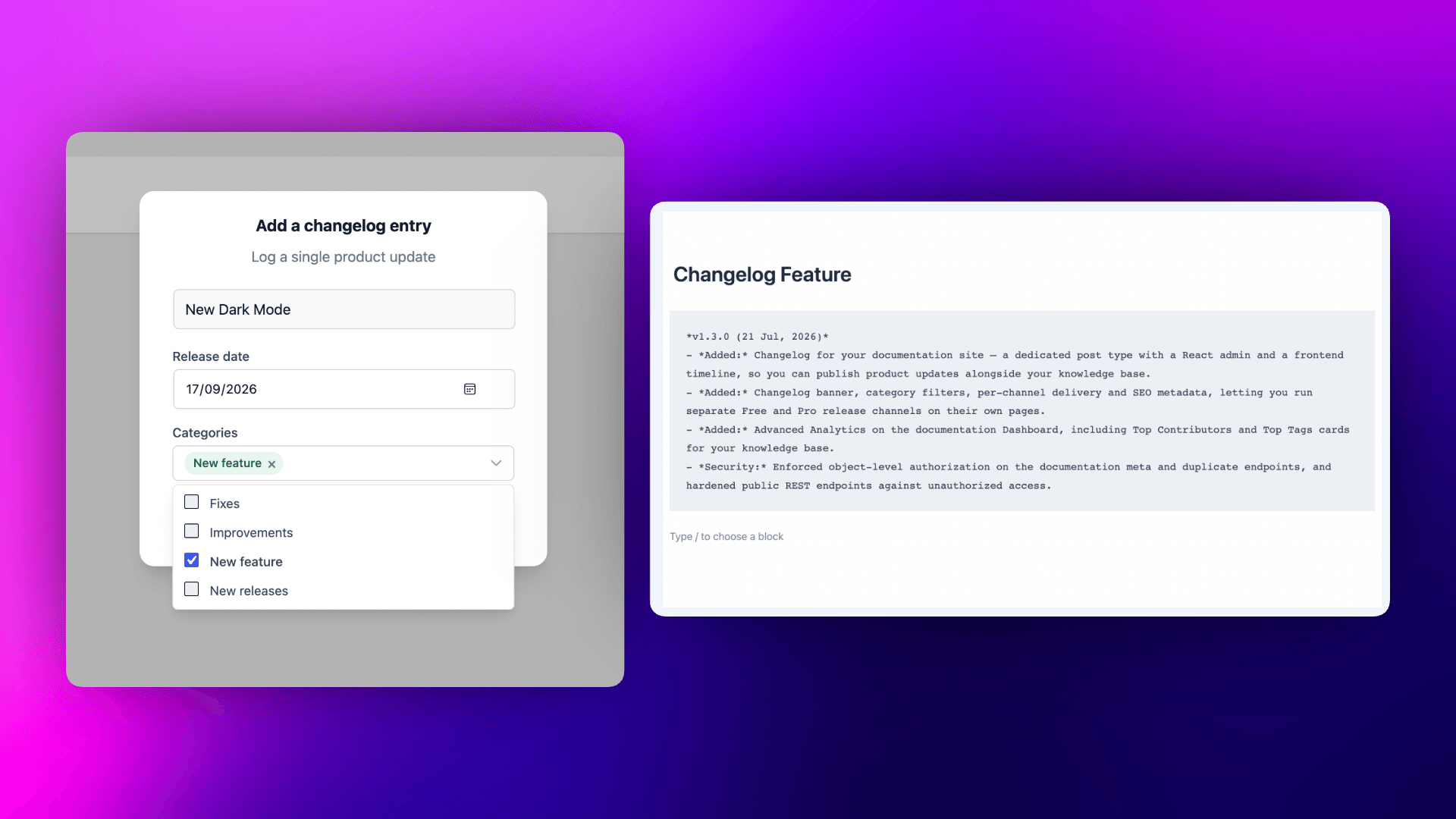
A few things worth knowing about how it behaves.
- Release date drives the timeline. It is tracked separately from when you last edited the entry, so fixing a typo does not push an old release back to the top.
- Entries reorder by dragging. If two things shipped the same day, put the one that matters first.
- Contributors are shown. Avatars appear on each entry, so your team gets visible credit for what they built.
- Drafts work as expected. Write entries as you go, publish when the release lands.

Choose How Your Changelog Displays
Most products need one timeline. Some need several. weDocs handles both, and you can switch between them at any time.
Single changelog puts everything on one page, with channels turned into filters your readers can toggle. This is the right choice for a single product, and it is the default.
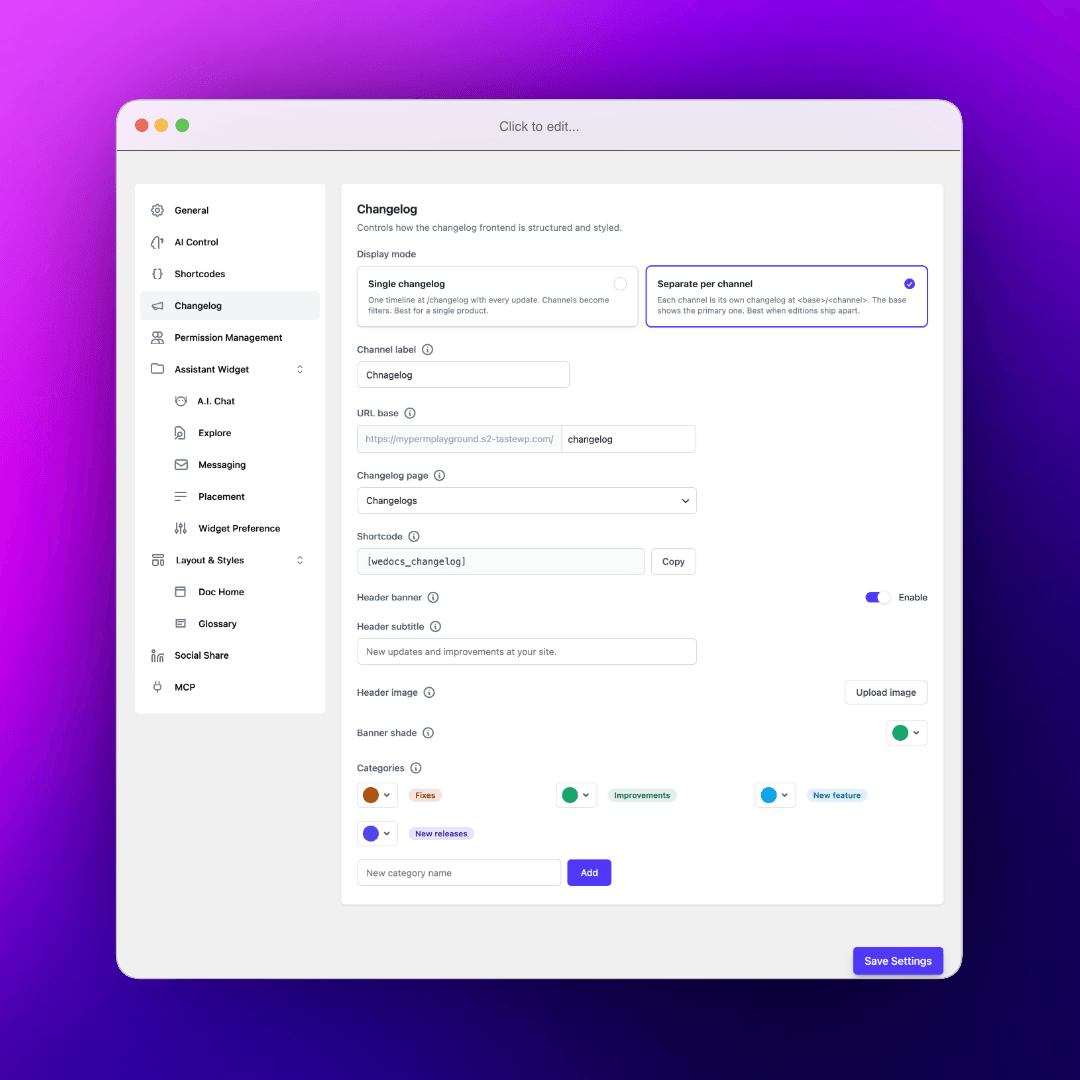
Separate per channel gives each channel its own address, so a free edition and a Pro edition each get their own page. This suits teams shipping editions on different schedules, or a company maintaining several products under one site.
You can also rename what channels are called publicly. If Products, Editions, or Apps describes your setup better than Channels, use that instead.
Make It Look Like Part of Your Site
A changelog that looks bolted on gets treated as an afterthought. This one is meant to look like yours.
- Your own URL. The default is yoursite.com/changelog, and you can change the base to updates, releases, or anything else that fits.
- An optional header banner with a subtitle, an image, and a gradient tint, so the top of the page carries your branding rather than a bare title.
- Colored categories. Four come built in, covering new releases, improvements, fixes, and new features. Recolor them to match your palette, or add your own.
- Publish anywhere. Render the changelog on an existing page, or drop it into any page or post with a shortcode.
On the reader’s side, they get a timeline grouped by release date with the latest release highlighted, filters for channel and category, a page for each individual entry, and an RSS feed so the people who care most can subscribe.
Why This Beats a Separate Changelog Tool
Dedicated changelog services exist and several are good. But they come with two costs that are easy to overlook.
The first is another subscription. Most charge monthly, on top of everything else in your stack, for what amounts to a list of dated entries.
The second matters more. Your release history ends up living on their domain, under their branding, subject to their pricing changes. If you leave, the archive that shows years of steady development goes with them.
Publishing through weDocs avoids both. The changelog runs on your site, at your URL, in your design, and the content stays yours the same way the rest of your documentation does.
There is a practical benefit too. Your changelog sits beside the docs that explain each feature, which is where people already go when they want to understand how something works. A reader who sees a new feature in the timeline is one click from the documentation for it.
If you are still deciding what belongs in a changelog, our guide on what a changelog is covers the standard format and what to leave out.
And if you are weighing this against release notes, the difference between the two is worth ten minutes.
How to Get Started
The changelog is a weDocs Pro feature. If you already have Pro, update to the latest version and you will find Changelogs under the weDocs menu.
Setup takes a few minutes. Create your changelog, add your first entry, and configure the display mode and URL under weDocs settings.
Our changelog documentation walks through every step, including the display modes, category colors, header banner, and the shortcode. Start there and you will have a live changelog before the end of the day.
Frequently Asked Questions
1. Which version of weDocs do I need?
weDocs 2.4.0 or later for the free plugin, and weDocs Pro 1.3.0 or later. Update both before looking for the Changelogs menu.
2. Can I use a URL other than /changelog?
Yes. The URL base is configurable, so you can publish at /updates, /releases, or whatever suits your site. If the page returns a 404 after changing it, save your permalinks once and it resolves.
3. Can I run separate changelogs for a free and a paid version?
Yes. Create a channel for each and switch the display mode to separate per channel. Each one gets its own address, and readers can move between them from the page.
4. Can I add the changelog to a page I already have?
Yes. Point weDocs at an existing page and it renders there with a channel switcher, or use the shortcode to place the timeline inside any page or post.
5. Can readers subscribe to updates?
Yes. Every changelog includes an RSS feed, so anyone following your releases can get them in their reader of choice.
Publish Your First Entry This Week
You do not need to reconstruct your product’s whole history to start. Create the page, write an entry for whatever you ship next, and let it build from there.
Within a few months you will have something genuinely useful, a record that answers “when did this change” for your support team and shows every prospect that your product is actively maintained.
Read the documentation to set yours up, or get weDocs Pro if you do not have it yet.
Subscribe to
weDocs blog
We send weekly newsletters,
no spam for sure!