

You spend three weeks building a feature. It ships on a Tuesday. Nobody notices.
A week later, someone emails asking whether you plan to build the thing you already built.
This happens constantly and it is rarely anyone’s fault. Release notes reach a fraction of your list. A tweet disappears in an hour. So the product improves faster than anyone can tell, support answers questions resolved months ago, and prospects cannot work out whether you are still shipping.
A changelog fixes that, and it takes about two minutes per release. Here is what one is, the standard format, what belongs in it, and where to publish it.
TLDR
- A changelog is a dated record of every notable change to your product, newest first, so users can see what shipped and when.
- There are two kinds. A developer changelog lives in your code repository. A product changelog lives on your website for users. Most guides confuse them.
- The standard format comes from Keep a Changelog, which groups entries into Added, Changed, Deprecated, Removed, Fixed, and Security.
- Only user-facing changes belong. Skip refactors, test updates, and dependency bumps unless someone notices them.
- “Bug fixes and improvements” is the most common entry in software and it tells the reader nothing.
What Is a Changelog?
A changelog is a dated, ordered record of the notable changes made to a product, listed newest first so anyone can see what shipped and when.
Each entry names one change, when it went live, and what type of change it was. New feature, fix, improvement, or removal. Read together they form a timeline of how the product has evolved.
A changelog does three jobs at once. It tells existing users what changed so they are not surprised. It shows prospects the product is actively maintained, which matters more than most teams realize. And it cuts down repeat support questions, because “when did this change?” now has a page to point at.
Changelog vs Release Notes vs Version History
These get used interchangeably and they are not the same. A changelog is the ongoing record of every notable change. Release notes are the announcement for one specific release, longer and written to explain why a change matters. Version history usually means the bare list of versions and dates.
Most teams need a changelog, with release notes on top for larger releases. We cover the full comparison in changelog vs release notes.
The Two Kinds of Changelog
This is where most advice on the subject falls apart, because two very different documents share one name.
The developer changelog is a file called CHANGELOG.md that lives in your code repository. Its readers are developers who need to know whether upgrading will break their setup. It follows a strict machine-friendly convention, and the all-caps filename is the convention because tools like GitHub look for it specifically.
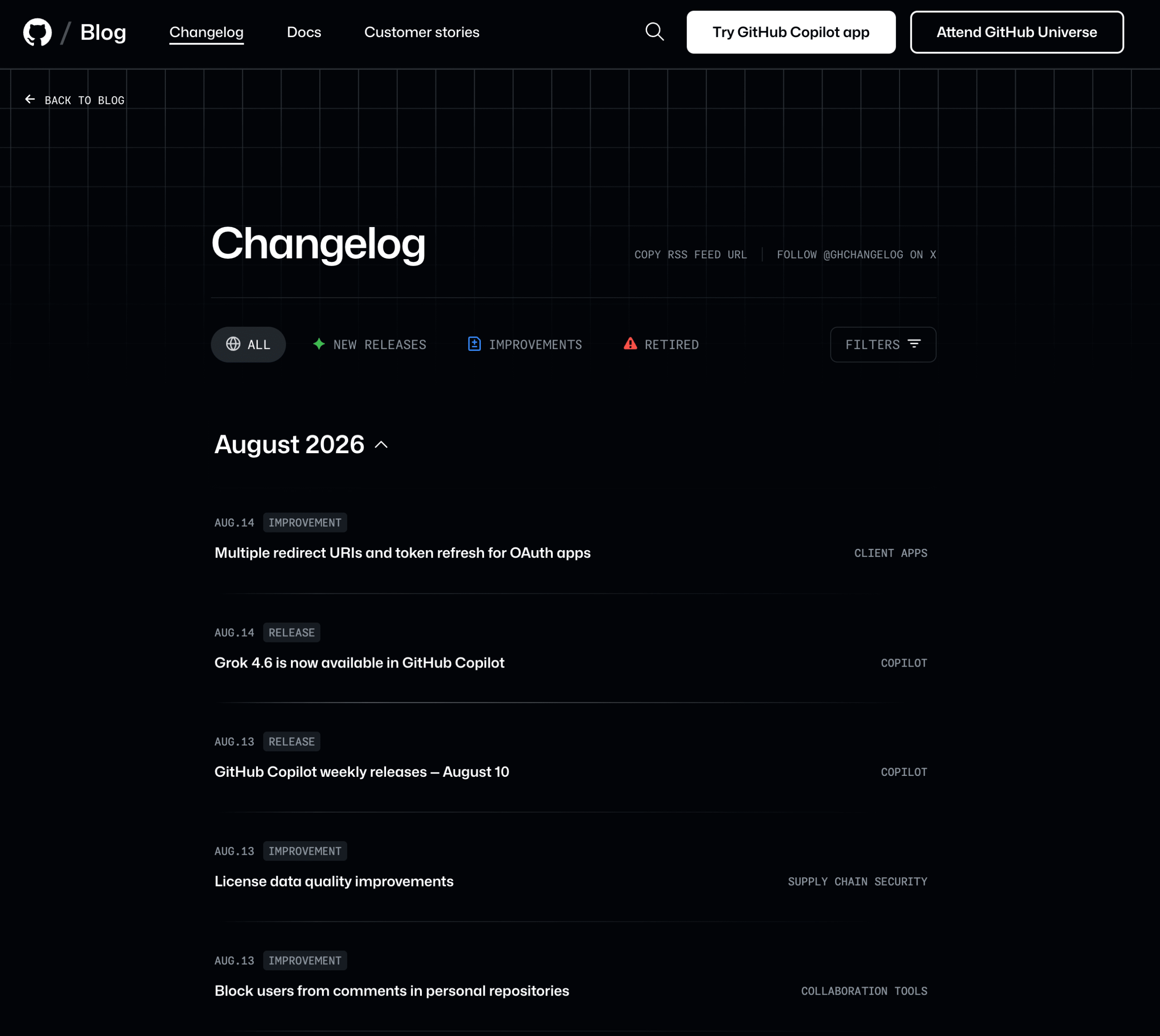
The product changelog is a public page on your website. Its readers are customers, and most of them do not care about version numbers. It is written in plain language, often includes screenshots, and reads more like a feed of updates than a technical record.
Plenty of companies maintain both. They are not competing options, they serve different people. The mistake is writing one and expecting it to do the other’s job. A repo file full of semantic version numbers helps no non-technical customer, and a friendly feed of feature announcements does not tell a developer whether the API changed.
Decide which one you are writing before you pick a format. Everything downstream depends on it.
The Standard Changelog Format
The most widely adopted convention comes from Keep a Changelog at keepachangelog.com, followed by thousands of open source projects and many SaaS products. It pairs with Semantic Versioning, which numbers releases as MAJOR.MINOR.PATCH.
It defines six categories. Use only the ones that apply to a given release.
| Category | Use it for |
|---|---|
| Added | New features and capabilities the user could not access before |
| Changed | Existing functionality that now behaves differently |
| Deprecated | Features scheduled for removal, so people have time to adapt |
| Removed | Features that are gone. Be direct and do not bury these |
| Fixed | Bug fixes, so anyone who hit the bug knows it is resolved |
| Security | Vulnerabilities addressed |
The structure looks like this.
# Changelog

## [Unreleased]

## [2.4.0] - 2026-08-11
### Added
- Public changelog with filtering by category

### Fixed
- Search returning stale results after an edit

## [2.3.1] - 2026-07-22
### Security
- Patched an access control issue in the REST API
The Unreleased section at the top is worth adopting. As work merges, entries go there. When you ship, that block becomes the new release and you start a fresh Unreleased. It removes the scramble of reconstructing what changed on release day.
Product changelogs relax this. They usually swap the six technical categories for friendlier labels like New feature, Improvement, and Fix, and drop version numbers entirely. That is a reasonable trade when your readers are customers rather than developers.
What to Include and What to Leave Out
The filter is simple. Only changes a user could notice belong in a changelog.
Include: new features, changed behavior, bug fixes people reported, removed or deprecated features, security patches, and anything that changes how the product looks or works.
Leave out: internal refactors, test suite changes, CI and build pipeline updates, dependency bumps that change nothing visible, and code cleanup. These matter to your team and to nobody else.
The exception is when an invisible change becomes visible. A dependency upgrade that raises the minimum PHP version is absolutely a changelog entry, because it can break someone’s site.
Teams that dump their full commit history into a changelog end up with a document nobody reads. Volume is not thoroughness.
How to Write Entries People Actually Read
Three habits separate a changelog people check from one they ignore.
Write for the User, Not the Ticket
A useful test comes from changelog practitioners: imagine you are writing to a customer who has used your product for six months and wants to know whether anything changed that affects them. Every entry should pass that test.
That means describing the outcome rather than the implementation.
- Write this. “Search now returns results while you type, instead of after you press enter.”
- Not this. “Refactored search to use debounced async queries. Closes #4821.”
Ticket numbers and internal jargon belong in your issue tracker. If your changelog reads like a commit log, it is a commit log. The same principles apply here as in writing clear and concise documentation.
Never Write “Bug Fixes and Improvements”
It is the most common entry in software and it communicates nothing. Someone who reported a bug cannot tell whether theirs is fixed. Someone evaluating your product learns only that something, somewhere, changed.
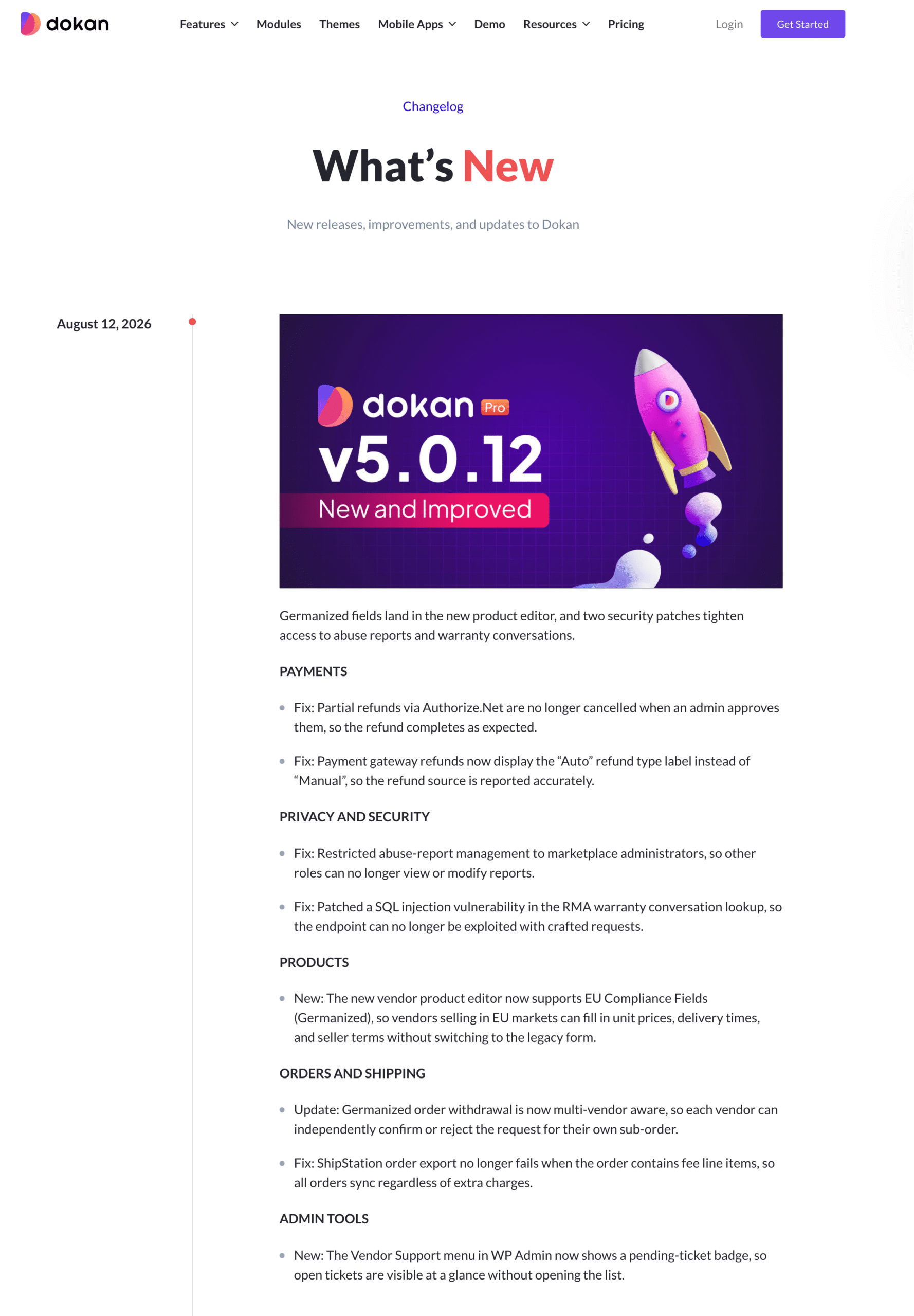
Name the fix. Reddit’s own changelog does this well, pairing each bug with a line starting “The fix:” that says exactly what now works. It also states openly that the list is not exhaustive, which is more honest than pretending otherwise.
Flag Breaking Changes Separately
Breaking changes are not just another bullet. They are the reason someone’s integration stops working after an update, and they deserve to be impossible to miss.
Put them at the top of the release, in their own clearly labeled section. Say what changed, what will break, and what the migration path is. If the change is complex, link to a full migration guide. Under Semantic Versioning, a breaking change also means a major version bump, which is itself a signal to your users.
This matters most for anything with an API, where a change on your side becomes a broken integration on theirs. Our guide on writing API documentation covers how to document those interfaces properly.
Changelog Examples Worth Learning From
Rather than copying a template, look at what strong changelogs do differently.
- Specific fixes, named. Reddit lists each bug alongside what now happens instead. A reader can find their issue.
- Honest about scope. Saying “this is not a complete list” beats implying completeness you cannot deliver.
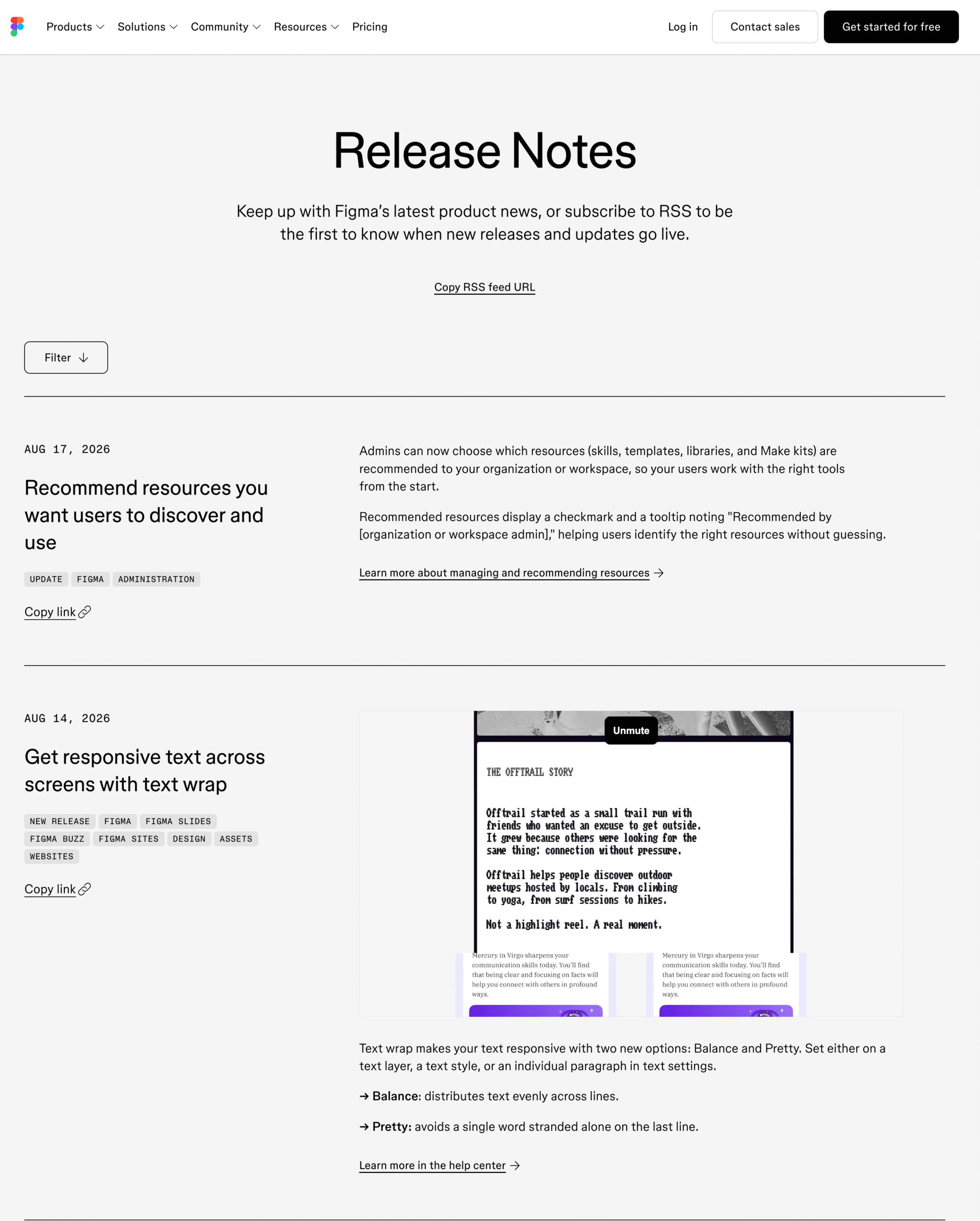
- Screenshots for visual changes. If the interface moved, show it. One image saves a paragraph.
- A consistent voice. Some products write theirs with real personality. That works, as long as clarity comes first.
- Filters once the archive grows. After a year, an unfiltered timeline is unusable. Category and product filters fix that.
The common thread is that a reader can answer one question quickly, which is whether anything here affects them.
Where to Publish Your Changelog
Your options depend on which kind of changelog you are writing and where your audience already is.
For a developer changelog, a CHANGELOG.md file in your repository is the right answer, and it costs nothing. Keep a Changelog gives you the format. Nothing else is needed.
For a product changelog, there are three broad routes.
- Dedicated changelog SaaS. Tools like Beamer, AnnounceKit, and LaunchNotes give you a hosted page plus in-app widgets and email notifications. Strong choice if you want announcements pushed inside your product, though it means another subscription and your updates living on someone else’s platform.
- A blog category or manual page. Free and simple. Fine at low volume, and it gets unwieldy fast once you have a hundred entries with no filtering.
- Your existing documentation platform. Puts release history next to the docs explaining the features, which is usually where people go looking anyway.
That last route is why weDocs added a built-in changelog. If your docs already run on WordPress, you publish a timeline at your own address with category filters, RSS, and separate channels for something like a free and a paid edition. It is a Pro feature, and it makes most sense when you are already documenting there. If you are not on WordPress, one of the hosted tools above will serve you better.
Wherever it lives, link to it from your documentation and your product. A changelog nobody can find does not do any of the three jobs it exists for.
Mistakes That Make a Changelog Useless
These come up constantly and every one is avoidable.
- Starting it and abandoning it. A changelog whose last entry is eight months old signals a product nobody is maintaining. That is worse than having none.
- Writing for your team instead of your users. Ticket references, internal feature names, and implementation detail belong elsewhere.
- Burying removals. People need to know when something disappears, and they will find out either way.
- No dates. Without a release date, an entry is trivia. The date is what makes it a record.
- Waiting for a big release. Small consistent entries build more trust than occasional large ones.
Our guide on common documentation mistakes covers the wider traps growing teams fall into.
Frequently Asked Questions
Start With Your Next Release
You do not need to reconstruct your product’s entire history. That project stalls before it finishes.
Create the page, write one entry for whatever you ship next, and add to it each time. Within a few months you will have something useful, and the habit will be doing the work rather than the archive.
The teams with the best changelogs are rarely the ones with the best writers. They are the ones who kept adding entries.
Subscribe to
weDocs blog
We send weekly newsletters,
no spam for sure!